
Specialty
Construction
Business Process
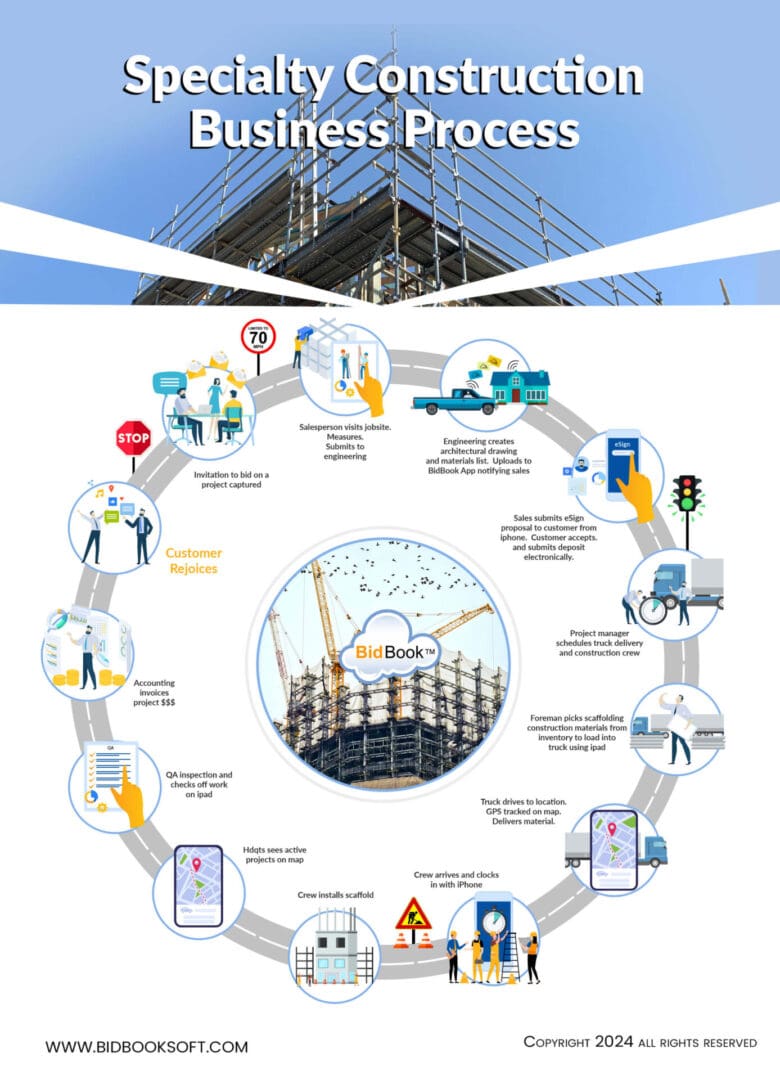
Discover the full 13-stage workflow — from bid invitation to customer delight — powered by BidBook CRM. Click any stage in the timeline below to see exactly how BidBook makes it faster and smarter.
Click any stage to learn how BidBook powers it
BidBook CRM is the central hub connecting sales, engineering, field teams, QA, and accounting in real time.
📬 Invitation to bid on a project captured
BidBook automatically logs the opportunity with all contact details, documents, and notes. Sales pipeline visibility starts immediately with real-time notifications.
📏 Salesperson visits jobsite, measures & submits to engineering
Using the BidBook mobile app on iPhone or iPad, measurements are captured on-site and instantly routed to the engineering team with photos and notes.
📐 Engineering creates drawings & materials list. Uploads to BidBook
Drawings and bill of materials are uploaded directly into BidBook. The app notifies sales instantly so proposals can move forward without delays.
📱 Sales submits eSign proposal. Customer accepts + deposit
Professional proposals are sent from the mobile app. Customers can review, eSign, and pay deposits electronically — closing deals faster in the field.
🚚 Project manager schedules truck & construction crew
Drag-and-drop scheduling in BidBook assigns crew and equipment. Automatic notifications keep everyone aligned.
📦 Foreman picks scaffolding & materials using iPad
Live inventory sync lets foremen select and load materials directly from the BidBook field app.
🛰️ Truck drives to location. GPS tracked. Materials delivered
Real-time GPS tracking gives headquarters and customers live visibility of deliveries on an interactive map.
⏰ Crew arrives & clocks in with iPhone
One-tap clock-in with geofencing ensures accurate time tracking and automatic payroll integration.
🏗️ Crew installs materials
Field updates and progress photos sync instantly to the central BidBook dashboard.
🗺️ Headquarters sees active projects on live map
Central command view shows every active job with real-time status, location, and crew activity.
✅ QA inspection and checks off work on iPad
Digital checklists with photo proof and instant approvals ensure quality before invoicing.
💰 Accounting invoices project automatically
QA-approved work triggers automated progress billing with seamless QuickBooks/Xero integration.
🎉 Customer rejoices
Happy customers lead to repeat business and referrals — all tracked and nurtured inside BidBook CRM.
Ready to transform your specialty construction workflow?
Full Process Infographic
Share This Infographic & Timeline
<iframe src="https://bidbooksoft.com/resources/infographics/infographic-specialtyprocess2/embed" width="100%" height="1100" frameborder="0" scrolling="no" style="max-width:1200px; border-radius:24px;"></iframe>