
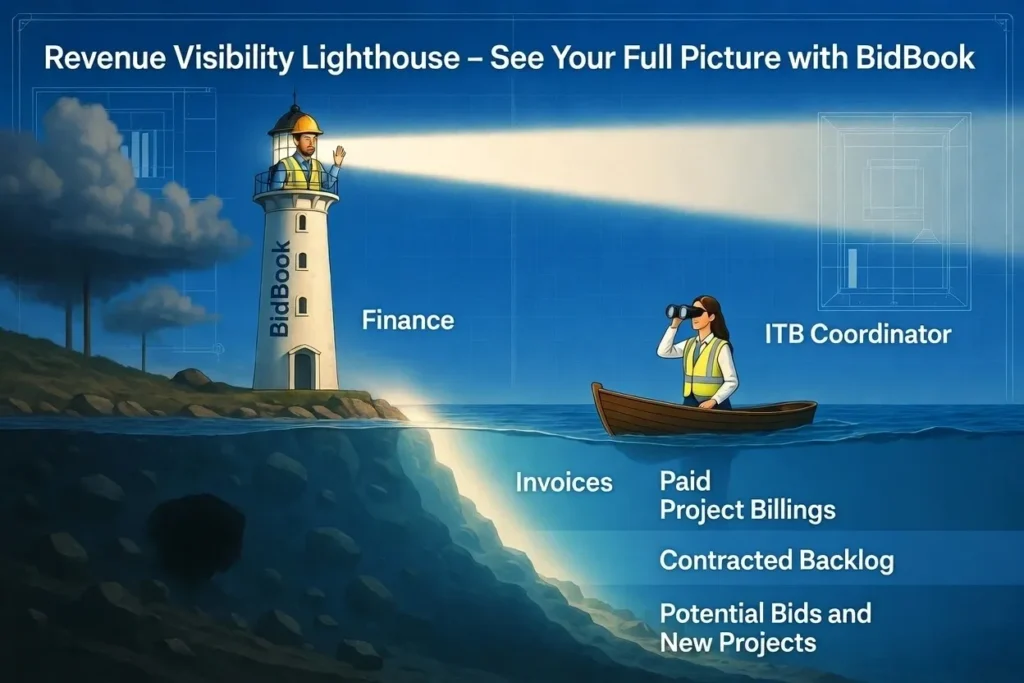
How to View All Revenue + Backlog in One Place (Construction CRM Dashboard)
What Revenue Blindspot Do Most Specialty Trade Contractors Face?
“Specialty trade contractors using BidBook CRM can finally see potential revenue, contracted backlog, invoiced amounts, and targets in one live dashboard—no more data islands or outdated spreadsheets.”
As a specialty trade contractor, you need clear visibility into your revenue health for any given month or quarter—past, present, or future. Yet most companies struggle to see the complete picture in one place.
A true revenue overview should include:
- Potential Revenue from Bid Contracts (opportunities still in play)
- Contracted Revenue (the “bird in hand” – awarded work)
- Invoiced Revenue (work delivered and earned)
- Backlog (contracted work yet to be delivered and invoiced)
- Invoiced & Paid (cash in the bank)
- Backlog projections going forward
- Revenue targets and attainment feedback
Without this consolidated view, it’s nearly impossible to answer critical questions like: “How much can we expect to bill next month?” or “Are we on track to hit our revenue goals?”
Why Do Data Islands Create Multiple Versions of the Truth in Construction?
The root of the problem is fragmented data. Financial data lives in separate systems:
- Accounting / billing systems (QuickBooks, Acumatica, etc.)
- Bid log spreadsheets
- Estimation tools
- Standard CRM tools (even Salesforce construction CRM without proper bid integration)
Typical fragmented setup: 8–10 applications. (Learn more in our post: The Data Islands Problem: Why Mid-Sized Construction Contractors Use 8–10 Apps)
This creates “data islands” and multiple conflicting versions of the truth. Sales teams see one version in their bid tracking software, project managers see another in spreadsheets, and finance has yet another in the billing system. The result? Confusion, missed opportunities, and poor forecasting.
Why Don’t Traditional Reports Give You Accurate Revenue Forecasts?
Pulling all this data into one manual report (or even a technical export) has major limitations. Reports are static snapshots. By the time they’re published, the numbers are already outdated. More importantly, reports don’t drive corrective action the way a true construction CRM software can through process automation and real-time updates.
Standard CRM tools (without dedicated construction bid management software) also struggle with time-based projections. Construction projects don’t bill revenue uniformly—especially with retainage, milestones, and varying timelines across multiple jobs. Answering “How much will we invoice in the next 6 months from current contracts?” becomes extremely difficult.
Another common issue is bidding win/loss tracking. When you submit multiple bids to different general contractors for the same project, spreadsheets often double-count opportunities, inflating forecasts and creating false hope.
How Does BidBook CRM Give You Full Revenue Visibility in One Place?
BidBook solves these challenges by bringing everything together in construction bid management software designed specifically for contractors. Here are practical methods to achieve full revenue visibility:
What Are the 3 Easy Ways to Pull Invoice Data into BidBook?
- Direct Integration – Pull invoice header summary data from your accounting system (Acumatica, QuickBooks, etc.) into BidBook using project numbers. One-way sync keeps it simple and secure—only authorized users see financials in the CRM.
- Periodic Export/Import – Export summarized invoice data (project #, amount invoiced, month/year) and import into BidBook twice a month. This quickly gives you accurate backlog at both project and organization levels without heavy integration costs.
- Simple Monthly Summary – Manually enter one total invoiced amount per month across all projects. This gets you organizational backlog visibility quickly and serves as a great starting point for smaller teams. Even simpler, enter one number entry for the month to give you high level comparison to team goals and break even. To find out how much has to be sold this month or this quarter, run the report that includes the following columns:
- Total Amount Contracted,
- Total Amount Invoiced
- Total Backlog to Deliver
- Total Closable Projects this Month
- Monthly Break Even Goal
- Monthly Invoiced Revenue Goal
For all methods, set your annual revenue targets in the CRM at the beginning of the year—either as monthly prorated goals or specific targets.
What Does Full Revenue Visibility (Including Backlog) Actually Look Like?
With BidBook’s cloud construction CRM, you get one version of the truth with powerful projections and actionable insights.
| Aspect | Traditional Spreadsheets / Reports | BidBook CRM Revenue Dashboard |
|---|---|---|
| Data sources | 8–10 separate apps | One unified view |
| Update frequency | Static snapshots | Real-time |
| Backlog visibility | Manual calculations | Automatic |
| Win/loss tracking | Double-counting risk | Accurate opportunity vs. contract |
| Actionable alerts | None | Built-in exception management |
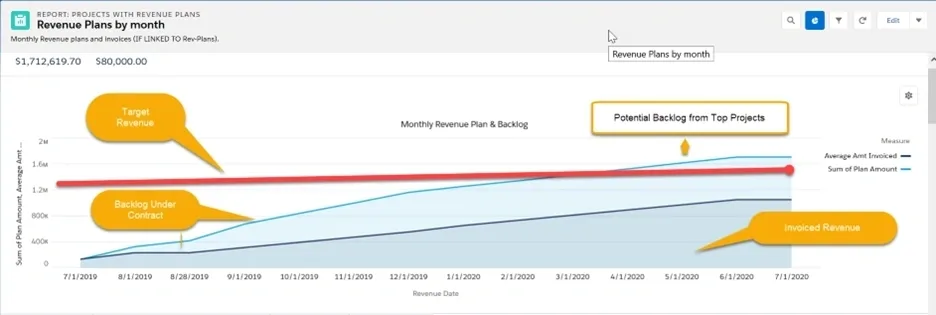
Key elements of the Revenue Plans by Month report:
- Red line — Your Target Revenue benchmark
- Light blue area — Backlog Under Contract (contract value minus invoiced)
- Dark blue line — Invoiced Revenue trend
You can drill down into any area to see project-level details: Project Manager, contract value, attainment, division budget, and more—right from your bid log.
How Do Project Opportunities Compare to Actual Contracts in the BidBook Dashboard?
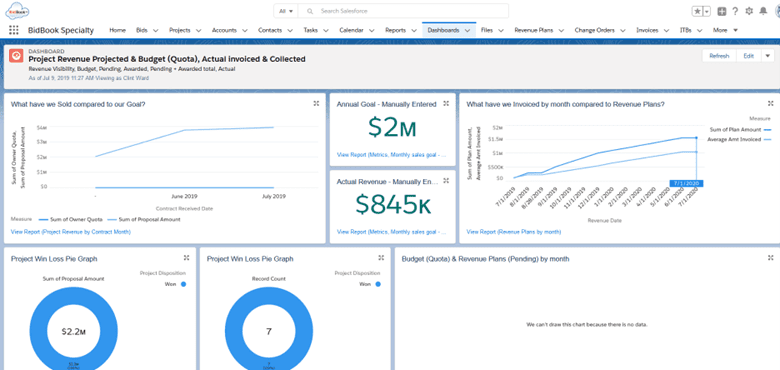
The BidBook dashboard takes visibility even further:
- Left side: What have we sold compared to our goal?
- Right side: What have we invoiced by month compared to revenue plans?
- Win/Loss pie charts for bidding performance without double counting every GC bid.
This unified view helps you manage to the exceptions (outliers): Target Revenue vs. Actual, Invoiced vs. Backlog, and Backlog vs. New Project Contracts.
What Are the Biggest Benefits of True Revenue Visibility in BidBook CRM?
- One version of the truth instead of the data islands problem
- Accurate time-based revenue projections, even with uneven billing and retainage
- Better how to manage construction bids with proper win/loss tracking
- Real-time backlog visibility for improved cash flow forecasting
- Ideal for construction CRM for small contractors and growing specialty trades
Whether you’re looking for the best bid management software for contractors, Salesforce construction CRM alternatives, or a dedicated pre-construction CRM and project bid tracking tools, BidBook delivers the revenue clarity most contractor CRM software misses.
Frequently Asked Questions
How do I see my backlog and future revenue in one place?
By viewing the Project Revenue Dashboard after billing summary data is loaded using one of the three methods explained in this article above.
Can BidBook integrate with QuickBooks or Acumatica for revenue tracking?
yes, connectors exist for both and others.
What’s the difference between potential revenue and contracted backlog?
Potential revenue is the estimated contract amount not yet contracted prorated across the estimated project duration while accounting for retainage and the bell curve of invoicing common to construction projects.
How does BidBook prevent double-counting bids on the same project?
We only count the project site and not every bid that goes to a general contractor in order to obtain a win/win project award. Or in the case of a third tier contractor a win/win/win. If you know, you know; meaning if you sell construction projects you now that a project award is not simply calling the property owner to see if you’ve been awarded the contract. For more details on how we do this, schedule a demo with us.
Ready to Eliminate Your Revenue Blindspot?
Schedule a demo today to see how BidBook can transform how your team manages bids, tracks projects, and forecasts revenue with confidence.