
Interactive Direct to Owner Specialty Construction Business Process General and Self Performing Contractors
Click any stage below to explore how BidBook CRM streamlines your entire workflow — from lead capture to customer referrals.
Click Any Stage to Learn More
See exactly how BidBook CRM powers each step of the process for General and self-performing Specialty contractors. Infographic embed code at the bottom.

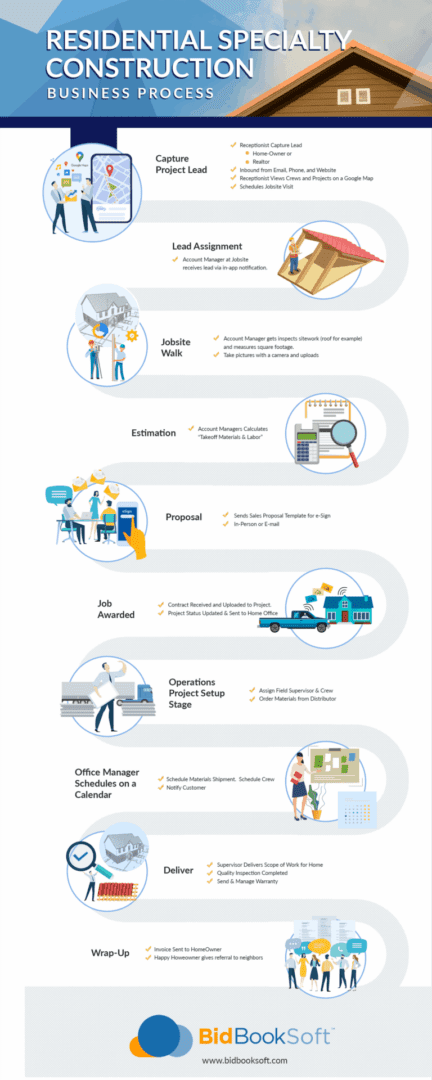
1. Capture Project Lead
Receptionist captures leads from homeowners, realtors, inbound calls, emails, website forms, and Google Maps jobsite views.
📍 1. Capture Project Lead

2. Lead Assignment
Account Manager receives the lead via real-time in-app notification.
📲 2. Lead Assignment

3. Jobsite Walk
Account Manager inspects the site, measures square footage, and takes photos.
🚶♂️ 3. Jobsite Walk

4. Estimation
Account Managers calculate takeoff materials and labor costs.
📐 4. Estimation

5. Proposal
Send professional sales proposals for e-signature via email or in-person.
📬 5. Proposal

6. Job Awarded
Contract received, uploaded, and project status updated.
🏆 6. Job Awarded

7. Operations Project Setup
Assign field supervisor & crew and order materials from distributors.
🚚 7. Operations Project Setup

8. Scheduling
Office Manager schedules materials shipment, crew, and notifies the customer.
🗓️ 8. Scheduling

9. Deliver
Supervisor delivers scope of work, completes quality inspection, and sends warranty.
🔍 9. Deliver

10. Wrap-Up
Invoice sent to homeowner and happy customer gives referrals to neighbors.
🎉 10. Wrap-Up
Full Process Infographic
Share This Interactive Infographic
<a href="https://www.bidbooksoft.com/infographic/process-specialty-1" target="_blank">
  <img src="https://bidbooksoft.com/wp-content/uploads/2026/04/infographic1-specialty@0.75x-scaled.png"
       alt="Interactive Residential Specialty Construction Process by BidBook CRM"
       style="max-width:100%; height:auto;" />
</a>