

Construction Bid Log: Pros, Cons + Free Excel Template & When to Upgrade
A construction bid log is the central record that specialty contractors use to track every bid opportunity—from invitation to bid (ITB) through award or loss. Whether it’s a simple Excel spreadsheet or a cloud-based CRM like BidBookSoft, the right bid log helps you win more profitable work with less chaos.
In this guide, you’ll discover exactly what a construction bid log should include, its real pros and cons, a free downloadable bid log template, and the clear signs it’s time to upgrade from spreadsheets to dedicated construction bid tracking software.
Table of contents
- What is a Bid Log?
- Key Benefits of Using a Construction Bid Log
- What Should a Bid Log Template Include? (Free Download)
- Pros and Cons of Bid Log Spreadsheets
- When Do You Outgrow a Bid Log Spreadsheet?
- Bid Log Spreadsheet vs. Bid Management Software: Side-by-Side Comparison
- Best Practices for Bid Logging & Analysis
- Frequently Asked Questions
- Ready to Move Beyond Spreadsheets?
What is the purpose of a Bid Log for Construction Contractors? What should a Bid Log include? Practical Uses, examples, limitations and when do you know you’ve outgrown the spreadsheet and need to a database or CRM application. And what are those Pros and Cons when you get there.

What is a Bid Log?
A construction bid log is a living database (often starting as an Excel spreadsheet) that records every project you pursue or evaluate to pursue. It captures project details, bid amounts, statuses, general contractors (GCs), estimators, and outcomes so you can analyze performance and forecast backlog.
Unlike scattered emails or sticky notes, a proper construction bid log gives you one source of truth for your entire pipeline.
Key Benefits of Using a Construction Bid Log
- Improved productivity — Prioritize high-probability, high-value bids and balance estimator workload.
- Fewer errors — Eliminate duplicate work and missed deadlines.
- Better decision-making — Spot win-rate patterns by GC, trade, region, or project type.
- Stronger GC relationships — Track follow-ups and hit rates for targeted outreach.
- Accurate revenue forecasting — See backlog and job-start dates at a glance.
- Enhanced team communication — Everyone sees the same real-time pipeline.
What Should a Bid Log Template Include? (Free Download)
Download our free construction bid log Excel template below. It includes the exact columns used by successful specialty contractors. Advanced bid log template is also free downloaded from our Tools and Checklists page.

Core Columns & Their Purpose (example from real BidBookSoft customer data):
| Column | Purpose | Example |
|---|---|---|
| Trade CSI # | Categorize by specialty (CARPENTRY, ELECTRICAL, etc.) | 06 – Wood, Plastics & Composites |
| Proposal # | Unique internal tracking number | 25-0142 |
| Estimator | Who prepared the bid (accountability & workload balancing) | JSmith |
| GC | General Contractors Competing for Project with Bids to Property Owner. | Skanska Beck J.E. Dunn |
| Project Location | City/State for geographic analysis | Philadelphia, PA |
| Project Name | Quick reference | Merck Rahway Biologics Building |
| Status | Current stage | Bidding / Submitted / Awarded |
| Bid Date | Deadline driving urgency | 05/15/2026 |
| Job Start | Forecast backlog & crew scheduling | 08/01/2026 |
| Budget or Lump Sum | Whether the bid is budgetary or lump-sum fixed price. Indicates risk level and pricing strategy | Lump Sum |
| Proposal Total | Your original bid amount | $1,345,000 |
| Best & Final | Revised amount after negotiations | $1,320,000 |
| Awarded Amount | Actual booked or contract revenue if won Forecast billing over project duration. | $1,875,000 |
| GC Awarded | GC awarded project by Owner. This become sales priority. | Beck |
| Trade1/Trade2/Trade3 | Divisions or Cost Centers Contribution to Estimate in Currency Amount Subtotal | Carpentry, Mill-work, Flooring |
| Winning Bid Amount | If lost, the amount of the winning bid? Often referred to as lowest bidder when bidding to government. | 1,250,000 |
| Industry / Market | Sector for trend analysis (Healthcare, Pharma, etc.) | Pharmaceutical |
| Drawing Location | Link to drawings and plans | Hyperlink or folder name |
| Project Information | Scope notes, special conditions, diversity requirements | New construction 50% MWBE goal |

Download the free bid log template and an advanced bid log template in Tools and Checklists.
Pros and Cons of Bid Log Spreadsheets
Pros
- Free or low-cost to start
- Familiar and customizable
- Great for small teams or low bid volume
Cons
- Becomes slow and error-prone with hundreds of rows
- Poor multi-user collaboration (version control nightmares)
- No automatic data relationships or validation
- Hard to generate reports or forecast backlog accurately
- Limited search, filtering, and mobile access
- Manual data entry prone to errors
- No interaction history or audit trail
- No history or proposal submissions or proposal document
When Do You Outgrow a Bid Log Spreadsheet?
Most contractors reach the breaking point when:
- You’re tracking 50+ active bids per month
- Multiple estimators need simultaneous access
- Sharing with team resources in bid coordination, business development or sales, finance
- You have multiple offices and remote or field resources working in the process.
- You need to link bids to contacts, estimates, proposals, change orders, or projects
- Data integrity and audit trails matter for compliance or financing
- You wish to institutionalize an optimized lead to project process including follow-ups, communication, and managing deadlines
- You wish to enhance contractor relationships proactively
- You want real-time dashboards, win/loss analytics, and backlog forecasting
At that stage, moving to a cloud database or dedicated construction bid tracking software becomes a game-changer.
Bid Log Spreadsheet vs. Bid Management Software: Side-by-Side Comparison
| Feature | Excel/Google Sheets | BidBookSoft (Construction CRM) |
|---|---|---|
| Data volume & speed | Slow after ~500 rows | Handles thousands of bids instantly |
| Multi-user collaboration | Risk of overwrites | Real-time, role-based access |
| Reporting & analytics | Manual | Automatic win-rate, hit-rate, backlog dashboards |
| Mobile access | Limited | Full app access anywhere |
| Data relationships | None | Links bids → GCs → projects → invoices |
| Automation & AI | None | AI workflow & smart alerts |
| Scalability | Outgrown quickly | Grows with your company |
| Process Workflow | None | Automatic & Configurable |
How BidBookSoft Turns Your Bid Log Into a Revenue Engine
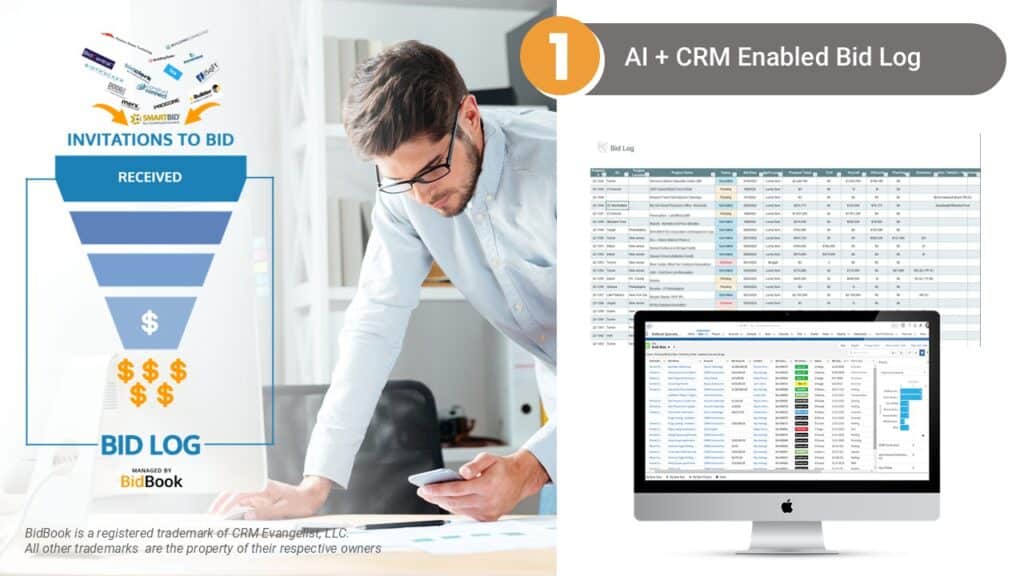
BidBookSoft (built on Salesforce) replaces your spreadsheet with a centralized, AI-powered construction bid log that lives inside a full CRM. You get:
- One-click proposal generation from your bid log
- Win/loss analysis by trade, GC, or market
- Automated follow-up reminders
- Backlog forecasting and resource planning
- Seamless import of your existing Excel bid log
- AI Bid Coordinator
- Streamline to operations with checklists
- Geomapping
- Integrated communication including SMS, email and even voice
Specialty contractors using BidBookSoft report higher win rates and dramatically less administrative time.
Best Practices for Bid Logging & Analysis
- Review your bid log every Monday (Internal Bid Review Day).
- Track hit rates by GC and trade to focus sales efforts.
- Use status filters to prioritize “high-probability” bids.
- Analyze “Difference” between original and awarded amounts for pricing accuracy.
- Produce monthly win-rate reports to refine your go/no-go process.
Frequently Asked Questions
A centralized record of every bid opportunity, including project details, amounts, status, and outcomes.
Yes—for very small teams or low volume. Most growing contractors quickly outgrow it.
Our downloadable Excel version above includes the exact columns top-performing subcontractors use.
When you need real-time collaboration, advanced reporting, or mobile access—usually around 50+ bids per month.
Yes—it becomes your live, centralized bid log with powerful CRM and automation features built in.
Schedule Demo. Or call us at 214-446-2080 to talk with a construction CRM specialist at BidBookSoft.
Stop wrestling with outdated bid logs. Import your Excel data into BidBook in minutes and start winning more bids with less effort.
Ready to Move Beyond Spreadsheets?
214-446-2080 or Schedule Demo where we can also review your bid log and process and import your data. Go to our home page.